Communication hub
United Wholesale Mortgage notifications

Overview
This project was a culmination of enhancements needed based on user feedback. There are several ways brokers working with United Wholesale Mortgage (UWM) can reach out to leads and borrowers using UWM technology. Brokers are provided with a UWM-specific phone number for automated calls with a Loan Officer Assistant, named "Mia", as well as texting. There needed to be a place where all inbound and outbound communication could be easily accessible in one spot.
The challenge
Automated calls are made on the Broker's behalf, there could potentially be thousands of automated calls going out per broker and each call summary was sent in a separate email. This made it very difficult for the Broker to quickly determine who wanted to be called back, when, and for what purpose. Brokers wanted a more cohesive way to view the information all at once. They also wanted to be able to set up the calls manually and choose the recipients and call type that went out.
Brokers find texting extremely useful but very few were using the UWM texting feature because the thread was buried in individual lead profile pages. They found it frustrating that they didn't have a place to see them all at once.
Project goals
-
House all the communication features in an easily accessible area
-
Provide the ability for Brokers to set up their own automated calls
-
Format Mia call summaries to be easily scannable
-
Create an experience for inbound and outbound texting
-
Give the texting feature higher visibility
Design
Organization
The Contacts and Client Connect pipelines were previously standalone pages. They were grouped with Mia and Texting to become the "Communication Hub". To make it simple to toggle between the four different sections, tabs were utilized.
Texting
Since the texting feature had very low visibility and therefore a low adoption rate, it was placed in the Communication Hub. It is still available in a contact's lead profile and can be viewed on an individual contact level. It was based on the texting experience on a tablet or mobile device since this is a UI most people are familiar with.

Loan Officer Assistant (Mia)
The build for the Mia call summaries is in a pipeline format to allow visibility into multiple contacts while viewing one particular summary. It mimics the text pipeline for consistency and UI familiarity making it more intuitive.
Brokers are now able to easily see when a lead would like to be contacted and can quickly move on without having to dig through emails.

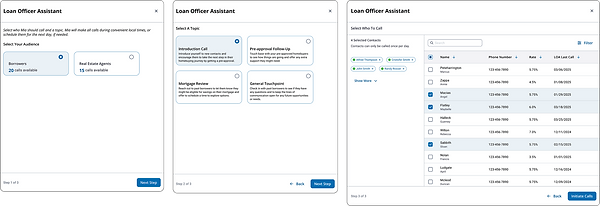
The other ask from Brokers was the ability to set up their own calls. To do that, the Broker will look to the Daily Call Bank in the top right and click "Set Up Calls" to kick off the flow with a short, stepped, modal to guide them to choose an audience, call type, and the eligible recipients. The calls are then scheduled to go out and a batch list is emailed to the Broker communicating which calls were successful, or, if a call was unsuccessful, the reason why.
Choose audience
Choose topic
Choose recipients
Contacts Pipeline
The Contacts pipeline allows Brokers to view contact information, send bulk email, and manually add new contacts.

Client Connect
Client Connect is a task-based pipeline. When an event pertaining to a lead is triggered, such as a rate drop, an automatic email or text will go out to a lead. A task is then created for the Broker to follow up with that lead. It will show them the lead's name, the subject of the email or text, what type of lead they are, and the due date.

Impact
With Mia, Texting, Contacts, and Client Connect all in one place, the Broker can clearly see what their next best action is and quickly communicate with their leads.